Helium Technology Hard Drives Are The Future

We are living in an amazing time where technology is appreciated by everyone. Every day the world is coming up with something new and innovative apps are changing the way we interact with the world. There are various apps for a workout, your diet, and whatnot. The technology has reached almost every sphere and has gotten its roots into everything.

The technology has also been into the computer and its hardware since its inception. From the mid-1970s to 2019, the technology has changed the way we store data in a PC. The latest example of such technology is the availability of helium technology hard drives.

These hard drives came not so long ago and were not available commercially. In November 2013, the largest hard drive which was available was 6 terabytes. But now we are seeing the biggest capacities up to 10 TB that are available n the market. Another year and you will be seeing the hard drives up to 16 TB to 21 TB. various companies have been purchasing and deploying the helium-filled hard drives over the past year. The companies have started looking at the very fewer failure rates of Helium-filled hard drives as compared to the air-filled hard drives.

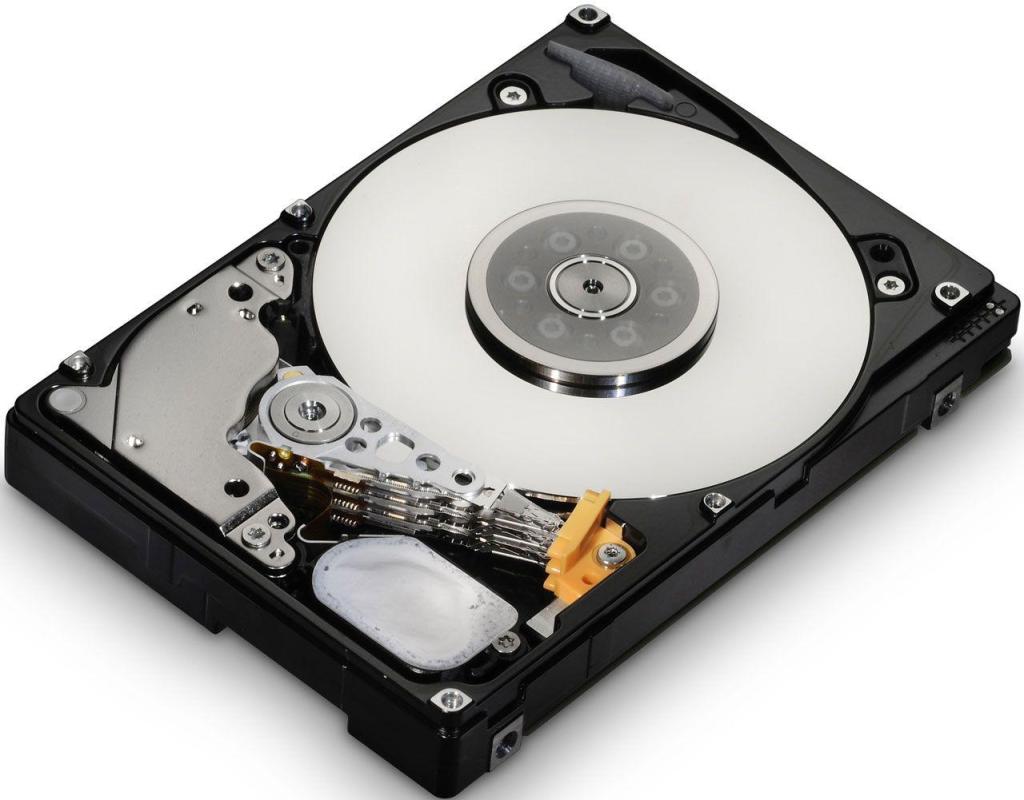
In the Air-filled hard drive, there is a disk that is spinning at the RPM of 7200. The air inside the hard drive is causing resistance to the platters. On the other hand, Helium is lighter than air. This is the reason why the balloons that are filled with helium float higher in the air. When you are replacing the air inside the Hard Drive with the Helium, this will reduce the amount of drag. This is why hard disks such as HGST 0F27352 Ultrastar are faster and with a storage space of 10 TB.

Helium Technology Hard Drives

This is also true that helium-filled balloons may float in the air for some time, but when after a while they come down as the helium escapes from the balloon. This is not only the case with the balloon also with other containers as well. The hard drive manufactures took years to create the container that could easily contain the helium in them while also functioning with the spinning disks. This container innovation made it possible that the helium-hard drives function well throughout their lifetime.

Helium is the second lightest as well as the second most available element in the universe. Helium i safe as it does not react with anything. It is 1/7th the density of the air. When you replace air with Helium, it is going to cause less turbulence inside, delivering various advantages at once.

Here are some notable advantages of helium advantages for hard drives:

  • The helium is going to squeeze the tracks together meaning that there will be more data per disk.
  • Thinner the hard disks, more the disks. There used to be 5 disks but now it has 8.         More the disks, the more the data storage.
  • The thinner the hard disks, the es power they are going to require spinning.
  • There is less drag for the disks in the helium hard drives, which makes it spin faster as compared to the hard disks filled with air.
  • Lesser the drag in the hard disk, the lesser is going to be the noise.
  • The helium hard drives are sealed which keeps the helium inside and keeps the contaminants out.

Conclusion:

The key to making the best hard drive is by reducing the power consumption while packing more data in one HDD. helium makes it possible and makes it possible that we can have high capacity hard drives like HGST 0F27352 Ultrastar. This has come as the perfect recipe for the innovation in storage. Decades have been spent on making a container to contain helium, which was way before even way before the smartphones existed.

Orignally Publish At: https://knowandask.com/helium-technology-hard-drives-are-the-future/
3 Things To Consider While Buying The Right Hard Disk Drive

The hard disk drive is the drive space which is a fixed data storage device. Hard drives are one of the most popular storage devices which exist in the market today.

You are going to find them on all the laptops, computers and in the external storage devices as well. These hard disks are using the magnetic storing technology that stores and retrieves data using the rotational disks.

There are the humming an d vibrating sound that the hard disk makes when they are in use. You cannot install any application software if there is no hard disk.

Once you have installed the operating system and the application software in your Hard drive, there is more to come.

There are several media files on the hand, that you might prefer like image files, movies, music, and much more.

If you are a fan of playing video games, then you are also going to install some video games or the purpose of entertainment.

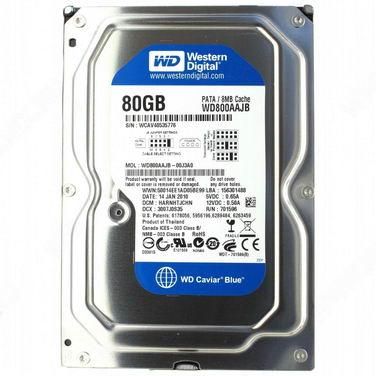
You would need a hard drive with more and better speed like Western Digital WD800AAJB. The way to entertainment is more storage and less time consumption.

If you are looking to buy the hard drive, here are some of the tips:

1. Hard Drive Storage Capacity

We start looking for a new hard drive when we need more storage space. Suddenly that space in your hard disk will seem low and your PC will become inadequate for more tasks. On a PC or laptop, you can add a second or the third hard disk and can increase the space easily.

The more storage that you are going to go for, the more many you have to spend.

Generally, one needs more space when there is too much data to store for numerous reasons. The customers who love playing games and obviously want something which can handle those game or the ones who want to use big software like video editing software and more.

More the hard drive space, the more the space to install programs and more the speed for the laptop.

2. Rotational Speed

Hard Drive

There are various new users who may not realize every feature of the hard disk. Every hard disk is not equal there is a thing called revolution per minute(RPM). Hard rives re coming in various RPMs like 4200, 5400, 7200 and 10000. The faster the RPM, the faster the hard drives will process and read your data.

The maximum number of hard drives is 5400 RPM, which is quite an average. The most recommended version of Hard disk is 7200 RPM. 10000 RPM is only needed by high end-users such as gamers. 7200 is best for offices, home PCs and laptops which are only used for general use.

3. Internal And External

When you are out to buy the hard disk drive, there are two choices you can prefer. The one is the external hard drive and the other one the Internal hard drive.

In most cases, people would be looking to increase the internal hard drives as they want the windows to run more smoothly or the programs which they have to install.

External hard drives are only needed when you are in need of the space for media like movies, videos, and bigger files. But in the case of internal hard drive, they are needed when you have to install big software, games, and more.

If you need space to install programs, then you need to upgrade your Hard disk with hard disks like Western Digital WD800AAJB, which can handle all your computer programs.

Orignally Publish At https://blog.newszii.com/hard-disk-drive


THINGS TO CONSIDER BEFORE BUYING A HARD DRIVE

It is very safe to say that we are living in an age where we are surrounded by data consumption and it is on the rise consistently. As data consumption increases, we need more storage. But, from where we are going to gain it from? Well, you need to buy a hard drive, which is going to provide an answer to this new age dilemma. These hard drives are going to store any kind of data, you want them to. There are a few things that you must look for when you are going to buy a new hard drive. 

There are some key specifications and other factors that you need to take into account when you are going to buy a new hard drive because you can buy an old or corrupted one. 

Here are those things that you must look for in hard drive:

Cost and quality:

There is always a war between the price of a commodity in respect to its quality. The higher you pay, the higher quality commodity is what you are going to get. There are many low prices hard drives that do not support the latest features of the upgraded versions. Although, some of the customers are satisfied with these hard drives, some are not. 

There are customers as well who are only looking for a longer warranty period, faster performance, improved reliability, and other features. For them, the hard drive with the best enterprise model is what suits them the best. For example, Buy Dell Hard Drivewith faster RPM and better cache memory is going to attract a lot of customers. Although, if you are not a high-end user and are looking for a hard drive or a home desktop or laptop, a simple hard drive would suffice. 

But on the other hand, if you are looking for a hard drive for gaming purposes, then you need to seek something with better performance and reliability. 

Reliability:

There is no hard disk that is going to last forever. Therefore, you must always consider the reliability of the hard drive you are purchasing. This is so because sometimes you are storing the data which is very important for you. You cannot lose that data at any cost. There is also the feature of the backup which is very useful when it comes to getting the lost data back. 

One of the easiest ways to determine the reliability of the hard drive is by checking its warranty period. The more the warranty period, the reliable the hard disk is going to be. 

Recording technology:

There are many hard drive buyers who do not know there there are different types of technology for recording data, which have their own trade-offs. One of the most common types of recording is the perpendicular magnetic recording, which writes and reads the data from the circular tracks. There is also another technology which s known as Shingled Magnetic Recording. In this technology, it overlaps the tracks of recording to store the data at a lower cost.

Although the SMR is less costly than the PMR, this benefit is not going to suffice the experience of writing delays and average performance. 

Speed and capacity:

One of the most important aspects to consider when you are buying a new hard drive is a general size or capacity or the read and write speed. The more the speed and the size of the hard drive, the more is going to ve the prize and the more it is going to be reliable. If you are unaware of how much bigger hard disk you need, you must get the bigger one than necessary if you do not want to sacrifice the reliability and most importantly, the performance. 

Conclusion:

Now that you know how to buy a reliable hard drive, there are the best hard drives in the market or online. For example, you can Buy Electronic Components and Equipment Online and might get it for a lesser price as compared with the market one. A better hard drive is going to be the lifeline of your PC or laptop. 

Originally Publish At: https://mytrendingstories.com/article/things-to-consider-before-buying-a-hard-drive/

EVERYTHING YOU NEED TO KNOW ABOUT THE NETWORK PC ADAPTERS

Before getting into buying the network adapter, you must know what a network adapter is and for what purpose it is used in the computer. Well, it is an electronic component, which is used in a laptop or computer so that they can interface with the local computer network. They can work with the wired connections which include the ethernet cable, wireless using the routers or both.

BUT HOW ARE YOU GOING TO KNOW WHETHER A PC ADAPTER IS PRESENT IN YOUR PC OR NOT?

In both the PC as well as the laptops, you need to look for an RJ-45 jack on the back of the computer. It will appear like a phone like jack but will be bigger in size. When you are looking for in a notebook computer, the jack is going to look like thin metal, a removable metal device that is in the size of a credit card.

For the computer, which is running on windows, they may contain integrated adapter chips. What you need to need to do is to activate the device from the control panel. In any computing device, you need to look for a small external device that has the lights connected in the USB port.

HOW TO BUY PC ADAPTERS?

Customers research a lot when they are looking for PC adapters. You can find many suppliers which are selling various electronic equipment online as well as offline. But to buy PC adapters online or offline is often a challenging task as you do not know which one to go for. The online sellers today are selling these adapters at a very affordable price and selling them with a router as a part of a kit. This kit is known as the home network kit.

There are various kinds of sellers online as well as offline and much can be found selling both the ethernet and Wi-Fi supported adapters, carrying mostly the similar functionality.

HOW ARE YOU GOING TO INSTALL THE NETWORK ADAPTER?

There are only two steps which are involved in installing Pc adapter hardware:

  1. The first step involves connecting the hardware to the computer.
  2. The second step is installing the software for the hardware to work

For the PCI adapters, what you need to do is to shut down your PC first and unplug the power cord in order to install the adapter. A PCI adapter is that is going to fir into a long and narrow slot on the motherboard. The case of the PC must be opened and it must be fitted or installed neatly.

Note that only the adapters which are Wi-Fi supported can be plugged into the computer when the PC is running normally. When you are installing a hardware system, you need to install the software in order to activate the hardware to work. You need to complete the basic software installation which is very necessary for the device to work.

Buy PC adapters online

The installation is done through a CD-ROM which contains the information for the hardware. With this, the software is going to allow the operating system to communicate with the Adapter.

CONCLUSION:

The network adapter is one of the main components for both wired and well as wireless computer. Sometimes you need to buy the network adapter separately as without this there is going to be no internet connection.

Originally Publish At https://www.onmypost.com/network-pc-adapters/

Everything You Need To Know About RAM (Random Access Memory)

RAM or Random Acess Memory is one of the most important components in a desktop, laptop, smartphone, and tablet. Every system would be very slow without it or won’t work. Any program or a game in the PC or Tablet won’t perform or would cause the system to collapse and shut down. 

But how will you define a RAM? Well, it is a type of fast computer memory which stores all the information that your PC needs at the moment or soon. RAM is different from the system storage like the hard drive. In hard drives, the information is stored for a long time. But RAM is where the processor load things up that needs to be found soon. This is what makes the speed of a PC. 

There are different types of RAM variants available in the market. The future of RAM is DDR4. It is because of less energy consumed with higher clock speed. But the demand for the present RAM’s is DDR3. You can buy DDR3 online at various e-commerce websites or from the stores near you. 

Short Term Memory:

Perhaps the best definition of a RAM is a short term memory of the computer. It is storing all the information about the web browser, the game you are playing, the software you are working on so that you can access the information quickly. Data in RAM can be read from anywhere at the same speed because it is a hard-wired connection to your system. RAM is not designed to stay focused forever and moves to the next task at any moment’s notice. It forgets everything it learned. This is what makes the RAM quite efficient to handle multiple tasks at a time. 

Different types of RAM:

There are a few different types of RAM’s. The most common type of RAM in the market today is DDR4. Still, there are older systems which may use DDR 2 or DDR3. This generally means the generations of RAM used in the PC’s or laptops. These cannot be interchanged as with every generation there some physical changes in them. 

The biggest consideration while buying a RAM is the amount that is needed for your system. The least requirement of buying a RAM is the minimum amount of it needed to run the system. The requirements used by the systems nowadays are somewhat between 1 GB to 8 GB depending on how bigger the system is. 

The more the gigabytes, the more it can help with multi-tasking. With more RAM for your PC, you are going to witness improvement in the speed of your system. More amount of RAM is also very useful to play heavy games. 

Importance of RAM:

RAM is one aspect for the systems which is very important for your System. Without RAM, your PC’s, tablets, Smartphones will run too slow. Too much load on the system might even shut it down. Having enough RAM matters when you are carrying out complicated tasks like video editing and playing games on your PC. It is obvious, that 8GB RAM will cost more than a 1GB RAM but a bigger RAM will also have a bigger impact on your PC. 

Unless you are doing something big, just make sure that you have enough RAM to carry out your day to day activities on the PC. if you are looking to buy something powerful enough, they there are a wide variety of RAM with different speed and size you can choose from. 

Conclusion:

RAM is an important aspect of a computer which cannot be denied. With a bigger RAM, you also need a bigger hard drive. You can buy HP hard Drive online as it is one of the best quality hard drives and a better combination with your RAM. more the RPM’s of Hard drive, the better is going to be the speed of the PC.

Originally Published At: https://www.techmeworld.com/everything-you-need-to-know-about-ram-random-access-memory/

Reason To Buy And Use Dome Security Cameras

Want to make your business and home secure? Security cameras provide the best inconspicuous protection from all the people who are not required within the safe premises of a place. Now, there are many options available in the market to choose from and they all will solve the different purpose for you. These days the best ones that are available in the market which are preferred by most of the businesses houses and homes are the dome cameras.

Dome security cameras are called so because they are in the shape of a dome. Dome cameras are considered as the best kind of surveillance systems which are installed inside homes, casinos, restaurants, retail stores. Dome cameras are fashionable, and they blend quite well with the surroundings of any setting or home. The dome shape of the cameras makes it difficult for the onlookers to tell which side the dome camera is aiming at the people around. When you are shopping for a dome camera you must consider buying the one with the night vision or if you wish to go for a superior option you must go with an infrared dome camera.

The different type of dome cameras includes outdoor, indoor, Internet Protocol (IP), Infrared, Pan-Tilt-Zoom (PTZ) and the vandal-proof camera. Unlike the other security cameras that are bulky, the sleek appearance of the camera and its super small size allows it to blend better with the surroundings of your home. The 360-degree view of the camera makes them all the way more perfect for better viewing.

Indoor dome cameras may consist of some special materials which cannot withstand certain kinds of temperatures and weathers. The cameras are perfect for those who need indoor protection as they cannot withstand the different types of weathers and cameras. You can connect the IP dome cameras to the internet which will allow you to view the area under surveillance from anywhere in the world.

Some other reasons why to go for a dome camera?

Variety and Diversity

The dome cameras come in different shapes and sizes which mean that you get unnumbered options in the dome cameras to choose according to your needs and requirement.

Some of the best cameras that are raging the market at the moment are:

·         Pelco PMM20A

·         Panasonic WV-SF549

·         Pelco C10DN-7X 540TVL

Wide Angle Coverage

The dome cameras are flexible and multi-functional which sets them apart from the bullet-shaped camera. Unlike the bullet cameras, the dome cameras do not exclusively and intensively focus on the target area, but they cover a wide-angle with their lens. The dome cameras transform into panoramic surveillance cameras that come packed with multiple sensors. The wide-angle cameras give a 360-degree view of the area and which is why they are able to stagger a larger area.

There are very fewer chances that the Shoplifters, thieves will shoplift from a place that has dome cameras installed everywhere. The dome cameras are fastened to the wall because they deter theft. Cameras work the best in the areas where there is high-traffic or the places that are very much crowded as those areas require constant surveillance.  

Installation

The installation of the dome cameras is super easy. No hassle, not much is required for installing the camera. You can simply do it within a very limited time.

Not only are the advantages but there quite many downsides too which we want you to know

Not Vandal Resistant

Be very sure before choosing the dome camera with the perfect shape. If you choose the wrong one, then it might get damaged easily without many efforts and that would decrease its life. They are susceptible to damaging and rough handling. If you are planning to put up a dome camera on the low-lying walls then visitors and onlookers can reach it easily and then there are more chances of it getting damaged. 

These are fit for any kind of operation and are used everywhere whether commercially or at homes. Since they come in a variety of sizes so, you can purchase them for fulfilling your purpose and needs.

Conclusion

Well, when you buy electronic components and equipment online, then you must make sure that you remember all these points in order to make a satisfactory purchase. Sai Tech is one of the best platforms from where you can buy your favorite gadgets online. 

Originally Published At: https://poundingtechno.com/reason-to-buy-and-use-dome-security-cameras/

What Are The Tips for Buying Hard Drives Online

A hard drive is the real workhouse of the PC. It is the most critical component of your PC. The Hard drive is something where all your critical data is stored like an operating system and various other programs. The bigger the hard drive, the better is going to be the performance of the PC. Buying branded hard drive like a dell hard drive is also beneficial for the speed of the PC. The better the quality, the better it is going to be the speed of the PC.

Shopping for computer hard drives must not be difficult. But it is also true that there is a lot of room for the error. Which is why buying the hard drives with the right tips is necessary. Follow the below-mentioned guidelines and forget about buying the wrong hard drive.

image

Here are some tips for buying the Hard Drives online:

The size and interface of hard drives:

One of the most basic things that you need to decide what size and interface you are going to go for. Data drives are available in two factors, a 2.5-inch drive, and a 3.5-inch drive. In hard drives, the data is stored on a metal disk which is spinning regularly. More the disk, the greater is going to be the capacity.

The 3.5-inch hard disks can be of 12 GB and  2.5-inch hard disks are with a maximum capacity of 5TB. Generally. These 205-inch hard drives are used in laptops.

Performance and storage capacity:

There are some other things which cannot be overlooked while buying hard drives.

Storage capacity:

There are two types of hard disks, which are SSD and HDD. HDD can come in a wide range of capacities, 16 TB at most due to some physical limitations. On the other hand, SSD’s cannot be

Max more than 5 TB per drive.

Transfer speed:

The performance of a hard drive is also determined by many other factors like transfer speed. RPM (revolutions per minute) is an important factor. Higher the RM, the higher is going to be the speed of the hard drive.

Cache:

When you are transferring the data from one section the drive to the another, it uses a special area for embedded memory, which is called a cache space. The larger the cache, the faster it is going to be the transfer. The cache space of modern hard drives can range from 8MB to 256 MB.

The cost of the hard drives:

When you are shopping for the hard drives, you are going to come across a number of hard drives that are going to look very similar on the surface. The major differences are going to be the features that are only relevant according to your needs. Select a hard drive that fits your needs as well.

However, with different features added to a hard drive, the cost is also going to increase. More the capacity, the more is going to be the price of that hard disk. The IBM internal hard drive of 4 TB is going to cost more than the 2TB variant.

Internal hard drives vs external hard drives:

One of the final things that you need to consider whether why are you buying a hard drive is whether you need a hard drive for your laptop/PC or an external hard drive. The external hard drives are useful for making a backup, storage or transfers. They can be easily connected to USB and can transfer data easily. These hard drives are portable and can be used with multiple computers and laptops.

On the other hand, the internal hard drives are the exact opposite. They are bigger in size if compared with the portable external ones. The internal hard drives are used in a PC or a laptop and act as a keeper of the operating system. They are connected inside the CPU’s and not through the USB.

Conclusion:

These are some of the most important things that you need to consider before buying one. When buying a new hard drive, trying and keep your data backup with someone so that you do not lose your data when upgrading to a new one. You can also buy dell hard drive online, which is one of the quality hard drives available.

Originally Published At http://www.trendzzzone.com/what-are-the-tips-for-buying-hard-drives-online/

What is the Function of a Network Interface Card?

It is a device that connects your computer to a local data network or the internet. The card helps to translate the data inside the computer into electrical signals which it sends through the network.

The signals are compatible with the networks which helps the computers to exchange information reliably with one another.

The Internet has become the basic necessity for anybody and so which is why interface cards are included in everything from PCs to desktops.

You also get the option to add the network card to the bare-bones of a computer just in case if it does not have one.

Description of the Network Interface Card

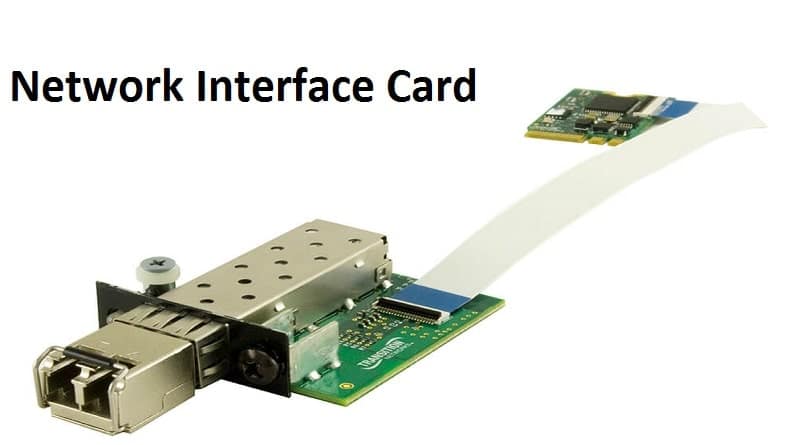
It is the size of a network adapter. It is basically in the shape of a plastic circuit board which is just of the size of a playing card. The presence of several chips in the network interface makes the help process the network and the PC.

The card slides into the personal computers chassis and then firmly with the connector which is present on the motherboard. A steel bracket holds the network interface card in place.

The bracket may have an antenna or a cable jack and that totally depends on the kind of network to which the computer makes connections. The bracket also has light-emitting diodes that indicate the activity and status.

Network Interface Card

Function

A network card functions as the middleman between the computer and the data network. For example; once you are logged into a website, the PC passes the website information to the network card which further converts the address into electrical impulses.

The impulses are carried by the network cables to a web server somewhere on the internet, which further responds by sending a web page back to you in the form of the electronic signals. The interface cards receive the signals and in return, it converts it into data which is displayed on the screens.

Drivers

The card hardware of the network needs programming to make it work.

Types of Network Interface Cards

The most contemporary kind of network cards works with the wireless networks of the Wi-Fi. The cards have an antenna to send some data signals via the radio waves. Some networks even use the wired Ethernet connections which have a rectangular plug that mates with the jack on the network’s card bracket.

In the new generation computers, the network adapter’s cards are the custom computer chips which are built into the PC’s motherboard. Every computer has the universal capability to have in-built network access. Having chips with the motherboard frees up the card slot for devices which you might want to add later.

The computer retailers sell the network accessory cards if you wish to install one in your computer.

Learn how to install a Network Adapter

It consists of 2 easy and quick steps

  • You must first connect the adapter hardware to the computer
  • Install the required software associated with the adapter

There are various ways through which you can buy a network interface card, either can buy it online or directly from the market. It is easily available so availability will never be an issue.

Here are some network interface cards that are worth your money:

  • Intel EXPI9404PT
  • Intel EXPI9404PTG2L20
  • Intel EXPI9404PTLBLK
  • Intel EXPI9404PTL
  • Intel EXPI9404PTL

Originally Published At https://knowandask.com/what-is-the-function-of-a-network-interface-card/